
The quickest way to listen to Dinesh D’Souza is his official podcast page, which hosts every episode with embedded audio and video, followed by the YouTube playlist for episode video and Apple Podcasts for a clean audio feed. Locals and Rumble carry extended or subscriber-only material, and C-SPAN archives his formal speeches. GOPcast also groups his show alongside other conservative programs for one-stop browsing.
TL;DR:
- The official podcast page hosts every episode with embedded audio, video, transcripts, and show notes for easy verification of claims.
- Main platforms include YouTube for videos, Apple Podcasts and Google Play for audio, Rumble for alternative videos, and C-SPAN for formal speeches and appearances.
- Subscribing involves a quick process on each platform, with options for notifications, offline downloads, and synchronized playback across devices.
- Most episodes are weekly, lasting 40 to 60 minutes, with formats including solo monologues, interviews, and in-depth topical discussions; live streams are rare.
- Dynamic ad insertion causes episode ads to vary by region and device, so checking show notes for timestamps and having backup sources helps verify content.
Table of Contents
- Where to Listen to Dinesh D’Souza on His Official Channels
- Which Platforms and Apps Carry Dinesh D’Souza Episodes?
- How Do You Subscribe and Get New Episode Alerts?
- What Format and Length Should You Expect From Episodes?
- Why Does Playback and Ad Content Vary by Platform?
- How Do You Listen on an iPhone or Android Phone?
- Are Episodes Live-Streamed, and Can You Catch Reruns?
- Can You Get Transcripts or Captions for Hearing-Impaired Viewers?
- GOPcast’s Perspective: Making Conservative Voices Easier to Find
- Find Dinesh D’Souza and More Conservative Shows on GOPcast
- Sources
- FAQ
Where to Listen to Dinesh D’Souza on His Official Channels
Dinesh D’Souza’s own site functions as the master library for his podcast. Every episode gets posted there with an embedded player, and many carry show notes or full transcripts that let you jump straight to a specific segment without scrubbing through audio. That matters more than it sounds: transcripts are the easiest way to confirm exactly what he said before you repeat a claim to someone else.
Locals (dinesh.locals.com) runs alongside the free feed as a subscriber community, often carrying bonus segments or extended cuts not distributed on public platforms.
Reliable official sources, in order of usefulness:
- Official podcast page — the canonical archive of every episode, with embeds you can play instantly.
- Show notes and transcripts — posted on individual episode pages, useful for quoting or verifying claims.
- Locals — subscription-based extras and community discussion tied to the show.
Pro Tip: Bookmark the episode page itself, not just the homepage. Homepages get redesigned; individual episode URLs tend to stay stable for years, which makes them the safer link to save or share.
Which Platforms and Apps Carry Dinesh D’Souza Episodes?
Beyond the official site, five platforms cover most of what listeners search for:
- YouTube playlist — the best option for video, organized chronologically so you can watch episodes in order rather than hunting through a channel page.
- Apple Podcasts — the primary audio feed for iPhone users, listing the DINESH Podcast as a weekly show distributed through the Salem Podcast Network.
- Google Play — Android users get a dedicated app listing that packages episodes for mobile playback.
- Rumble — an alternative video channel that often mirrors YouTube uploads plus extra commentary.
- C-SPAN — archives formal speeches and conference appearances, like his remarks at CPAC, which never show up in the regular podcast feed.
Video and audio aren’t interchangeable here. YouTube and Rumble show you his slides and visual references during topical breakdowns; Apple Podcasts and Google Play strip that down to voice only, which some listeners actually prefer for commute or gym listening.
How Do You Subscribe and Get New Episode Alerts?
Getting notified the moment a new episode drops takes about two minutes on any platform:
- Apple Podcasts — search “DINESH Podcast,” tap Subscribe, and enable notifications in the show settings.
- YouTube — subscribe to the channel, then click the bell icon and select “All” so new uploads hit your notifications immediately.
- Locals or Rumble — follow the channel directly; both platforms push updates to your feed once you do.
- Third-party podcast apps — grab the RSS feed link from the official site and paste it into apps like Pocket Casts or Overcast for episodes as soon as they publish.
Most podcast apps also let you download an episode for offline listening, which matters if you’re on a flight or somewhere with spotty service.
Pro Tip: If you listen across a phone and a laptop, stick to one platform account (Apple ID or Google account) so your subscriptions and playback position sync automatically instead of restarting from zero on each device.
What Format and Length Should You Expect From Episodes?
The show mixes three formats: solo monologues breaking down a news story, one-on-one interviews with authors and political figures, and topical deep dives that run through a single subject in depth. Most episodes land in the 40 to 60 minute range, released on a weekly cadence and archived permanently on the official site once published.
Recent themes worth searching for directly include election law commentary, interviews tied to his documentary work, and reaction episodes following major political news cycles. The Independent Institute also hosted a longer interview format titled “Reflecting on Freedom and America,” a good example of the kind of extended conversation that occasionally surfaces outside his regular feed.
Expect to find:
- Weekly monologue episodes reacting to breaking news.
- Guest interviews running longer than the standard solo format.
- Occasional crossover appearances on partner platforms, including a PragerU video built around similar themes.
Why Does Playback and Ad Content Vary by Platform?
If the ad in the middle of an episode sounds different from what a friend heard, that’s normal. Network-distributed shows commonly rely on dynamic ad insertion, which swaps ad content based on your device, region, or how recently you streamed the file. Downloading or saving an episode shortly after release tends to lock in that original ad break; streaming it weeks later can pull a completely different one.
Two habits solve most playback headaches:
- Check show notes first. Official episode pages frequently include timestamps and guest details, which makes verifying a quote far faster than re-listening to the whole file.
- Have a backup source. If an episode disappears from one platform, the official site or an archival host like C-SPAN usually still has it.
How Do You Listen on an iPhone or Android Phone?
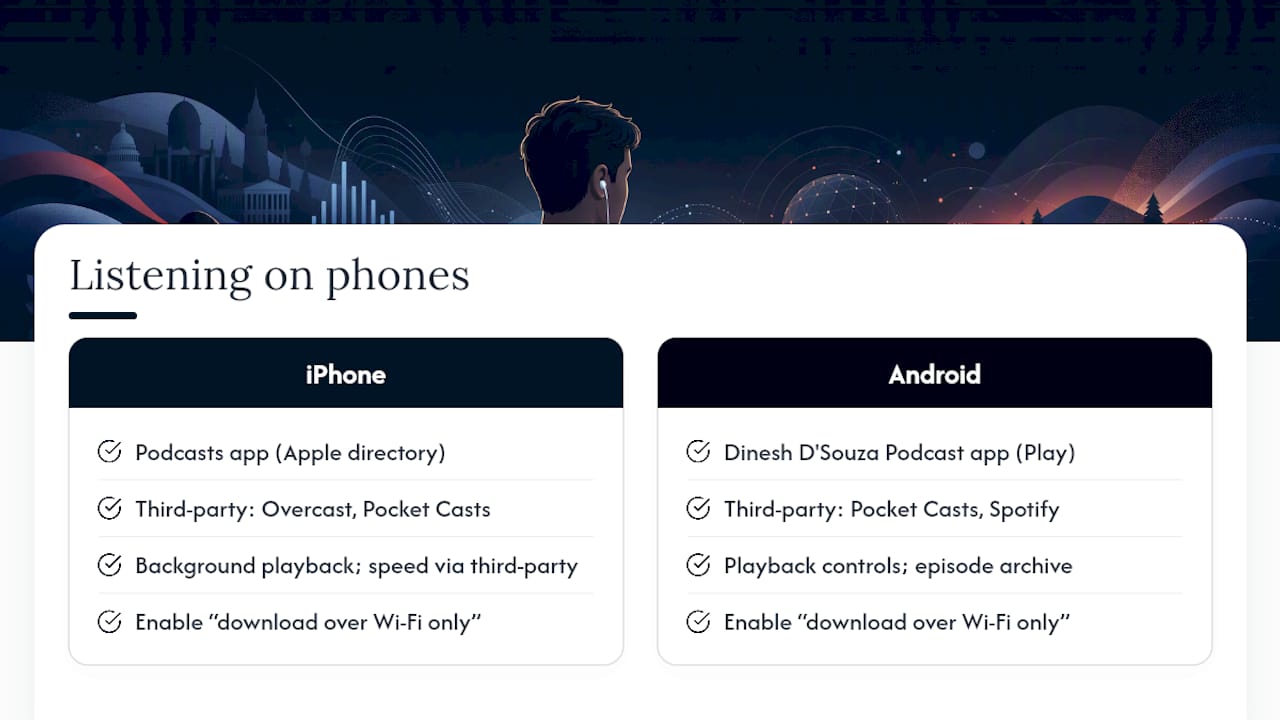
On iPhone, open the built-in Podcasts app, search “DINESH Podcast,” and tap the show to see the full episode list pulled straight from the Apple Podcasts directory. Tap any episode to stream it, or tap the download icon to save it for offline playback later. If you prefer a third-party app, Overcast and Pocket Casts both pull the same feed and add speed controls and sleep timers Apple’s default app lacks.
Android listeners have two solid paths. The dedicated Dinesh D’Souza Podcast app on Google Play packages episodes into a single interface built specifically for the show, complete with playback controls and episode archives. Alternatively, Google Podcasts alternatives like Pocket Casts or Spotify (which carries many independently distributed shows through their podcast catalog) work just as well if you’d rather manage all your listening in one app instead of installing a show-specific one.
Both operating systems support background playback, so the audio keeps running while you check email or switch apps. Both also let you adjust playback speed, which matters on hour-long interview episodes if you’re pressed for time. The one setting worth checking on either phone: enable “download over Wi-Fi only” in your podcast app if you’re worried about burning through mobile data on longer episodes.
Are Episodes Live-Streamed, and Can You Catch Reruns?
Most of the regular podcast content is recorded and posted rather than streamed live in real time, which means there’s no fixed broadcast slot to plan your day around. New episodes go up on a weekly schedule, and once they’re live, they stay archived indefinitely on the official site and major platforms.
Live streaming shows up more often around specific events rather than the daily show itself. Speeches, conference appearances, and panel discussions are the pieces most likely to stream live, and outlets like C-SPAN typically carry that kind of programming as it happens, then archive it for later viewing. That’s a different track from the weekly podcast, which functions more like an on-demand library than a live broadcast.
If you missed something live, reruns aren’t really necessary. The recorded version usually gets posted to the same archival page within hours, and platforms like C-SPAN and the official site keep those pages up long term rather than pulling them after a broadcast window. Your best bet for catching something you missed is checking the official site or the relevant archive directly, rather than waiting for a scheduled rebroadcast that may not exist for that particular piece of content.
Can You Get Transcripts or Captions for Hearing-Impaired Viewers?
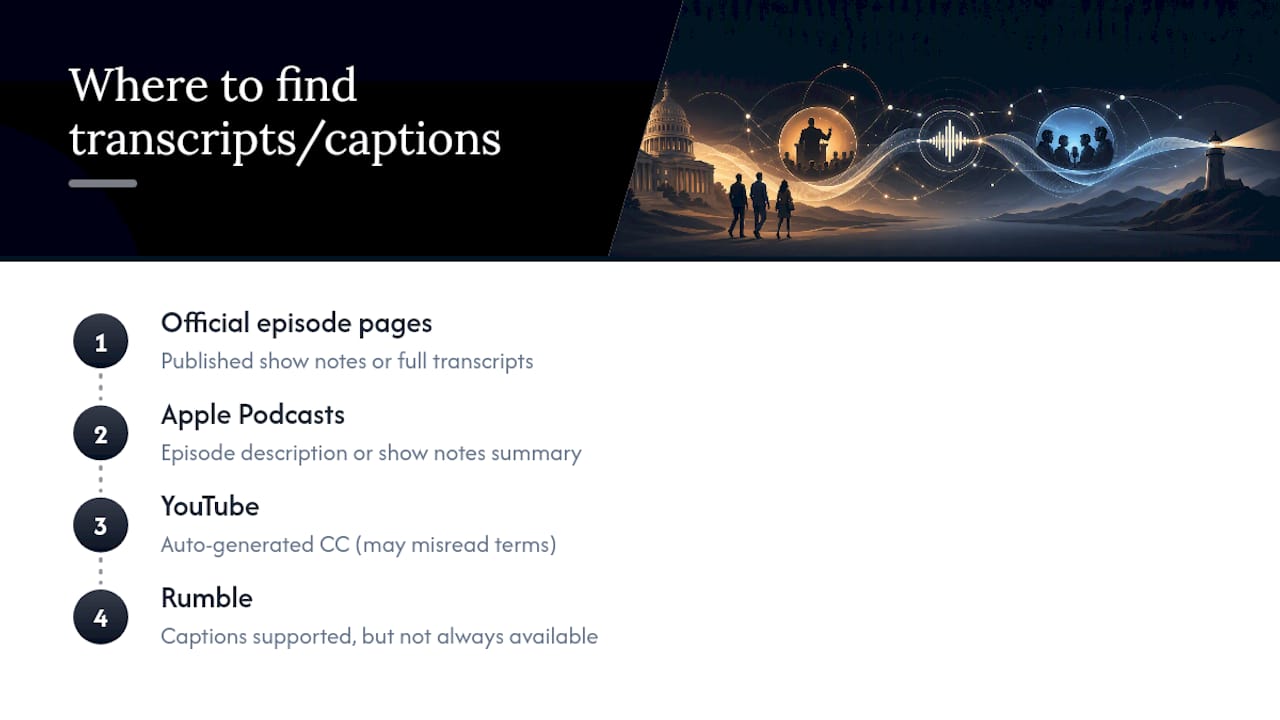
Accessibility options vary by platform, but you have real choices here. YouTube automatically generates closed captions on uploaded videos, and you can turn them on with the CC icon in the player, though auto-generated captions occasionally misread names or political terminology, so treat them as a rough guide rather than a verified transcript.
For accuracy, the official episode pages are the better bet. Many episodes come with published show notes or full transcripts written up alongside the audio, giving hearing-impaired readers a way to follow along with exact wording rather than relying on auto-captions. If a specific episode doesn’t list a transcript, checking Apple Podcasts’ episode description or the show notes tab often turns up a written summary of the main points covered.
Rumble also supports captions on its video uploads, though coverage isn’t universal across every clip. If captions matter to you, your safest approach is prioritizing the official site’s written show notes first, then falling back on YouTube’s auto-captions only when nothing else is available.
GOPcast’s Perspective: Making Conservative Voices Easier to Find
GOPcast curates prominent conservative programming so listeners aren’t left hunting across a dozen platforms for the shows they trust. Grouping Dinesh D’Souza’s work alongside other well-known conservative hosts doesn’t replace his official channels. It complements them, giving you a faster “listen now” path when you’re browsing rather than searching one show at a time.
— GOPcast
Find Dinesh D’Souza and More Conservative Shows on GOPcast
GOPcast aggregates various conservative programs into a single platform, providing listeners with a streamlined way to access multiple shows. Instead of hopping between platforms to catch Dinesh D’Souza’s commentary one day and a different political show the next, GOPcast puts curated shows like Ringside Politics, the Brian Kilmeade Show, and After Hours with Alex Stein side by side for quick browsing.
If you want a broader mix of political commentary alongside the shows already covered here, browse GOPcast’s conservative news podcasts category to see what else fits your listening habits. Pick a show, hit play, and you’re listening in seconds.
Sources
- DINESH · The Weekly Show · Dinesh D’Souza
- Podnews — podcast ad behavior (industry reporting)
- Video, Audio: Dinesh D’Souza: Reflecting on Freedom and America | Independent Institute
- DINESH Podcast - Apple Podcasts
FAQ
Was Dinesh D’Souza Pardoned by Trump?
Yes. Dinesh D’Souza received a presidential pardon in connection to a federal campaign finance conviction. He has discussed the case and its aftermath in interviews and on his own podcast.
Is Dinesh D’Souza a US Citizen?
Yes, Dinesh D’Souza is a naturalized US citizen. He was born in India and became a US citizen after moving to the country for his education and career.
Did Dinesh D’Souza Date Laura Ingraham?
Public reporting on Dinesh D’Souza’s personal relationships prior to his current marriage is limited and largely anecdotal. There’s no verified, on-record confirmation from either party establishing a dating history between them.
Is Dinesh D’Souza Still Catholic?
Dinesh D’Souza has spoken publicly about his Catholic upbringing and continues to reference his Christian faith in interviews and commentary. Specific current denominational details aren’t consistently documented in his public statements.
Where Can I Find Transcripts of His Episodes?
Transcripts and detailed show notes typically appear on individual episode pages on Dinesh D’Souza’s official site. If a transcript isn’t listed there, checking the episode description on Apple Podcasts often provides a written summary of the main points.